

Your manuscript is done! Now what? How do you turn those words into a book. Let’s look at the recommended software! We’ll look at this for novels and picture books separately because, while there is some overlap, they are creating different kinds of books. The addition of images to the picture books make it a fundamentally different kind of book, especially as ebooks.
Copyediting for Novels or Picture Books
First, your manuscript needs to be copyedited, fact-checked, and proofread. For these tasks, some people turn to AI. In reality, a spellcheck is a type of AI editing. I consider the programs that do grammar and usage checks to be a similar type of rules-based programs that check your story against the norms.
Personally, I like ProWriting Aid because it does a bit more than just grammar. For example, it checks for repeated words and allows you to find your “tics,” the unconscious repetition of words. In that previous sentences, I said “a bit,” which ProWriting Aid would tell me is a phrase I use too often. You can also do a house style to check anything extra you want. I use this to check my character’s motivations, looking for words like “need” or “want” to reveal their desires.
I prefer to hire a copyeditor, a person, to go through my manuscript. My copyeditor is excellent!
But the problem is this: I am a lousy copyeditor. When she returns my story, I must go through and actually make the corrections she indicated. And sometimes—how does this happen?—I fail to follow through. I manually check off every correction she indicates—and still I make mistakes.
From now on, then, I’ll run the final pdf through an LLM-AI to make sure it’s clean. Currently, I prefer Claude (I pay for the $20 level), but Gemini or ChatGPT could do the same. I wouldn’t use an LLM for fact-checking because none of them can write an accurate biography of myself. But for grammar and usage checking, I might do a final check. In this case, I use a prompt like this:
You are an expert copyeditor of children’s books using the Chicago Manual of Style. Go through the XXX.pdf document and indicate errors in spelling, grammar or usage. The goal is clarity, consistency, and correctness.
Note: Usage errors are important to include here! This will catch misuse of homophones (accept/except, there/they’re/their), commonly confused words (that/which, everyday/every day), idioms or phrases (all right/alright), redundancies and wordiness (added bonus/bonus), and inconsistencies (e-mail/email).
A Warning Against Inappropriate Software
Please - do not be tempted to just design your novel, or especially your picture book, in Canva, Powerpoint, MSWord or other program not designed for layout and design. The exception below is for novels laid out in word processors for which you are applying a professional template.
Poorly designed books have a poor chance of succeeding in a demanding industry. Learn either Indesign or Affinity for picture books—or hire professionals. Reedsy.com is my preferred place to look for freelancers, because Reedsy vets applicants and only includes professionals on their platform. Avoid other cheap platforms because the quality is usually lacking. To compete in today’s crowded market, you need the best produced book possible!
Tech Stack for Novels
Once the manuscript is copyedited, you can turn to formatting it so it looks like a novel. This can be daunting your first time through. There are two approaches that work equally well.
Templates for Common Programs - For Beginners
First, you can use templates for MSWord (PCor Mac), Pages (Mac), or Indesign (PC or Mac). I’ve used many of the templates from BookDesignTemplates.com, and consider them perfect for beginners. The templates will create the right margins, preselect fonts and set the size and spacing, create headers and footers, and more. They have layouts for fiction and nonfiction and show you the variety of headers/footers, fonts, and so on. You can choose how you want the book to appear and be confident that the novel will turn out as expected.
Indesign is the powerful Adobe program designed to layout complicated designs perfectly. Because it’s powerful, it has a steep learning curve. For any question you might have, though, there are tons of resources including videos or blog posts to walk you through the problem. Using a template here will help you become familiar with the program while scaffolded with the template.
One of the biggest objections to Indesign is the required subscription of $22.99 (price at time of writing). NOTE: I ONLY subscribe to Indesign, not the entire Adobe suite, which allows me to keep my costs under control. I consider that a minimal cost of doing business, but others complain about the monthly expense. One unexpected advantage of Indesign showed up when I sold international translations. The foreign publishing companies expect Indesign files, which transport worldwide, and are still the standard for publishing worldwide.
MSWord (PC or Mac) is Microsoft’s word processor. But word processors are not meant to do layout and design. If you stretch the limits of the program and dig into style sheets, though, you can produce a reasonable book. When you export to PDF, the file is acceptable to most printers. Pages (Mac) is Apple’s word processor and templates are also available for this program.
All-in-One Program for Print and eBook
Two programs allow for control of a novel’s layout and design for print, but also allow exporting as ebooks: Vellum (Mac only) or Atticus (PC, Mac, Linux, Chromebook). I’ve only used Vellum, but Atticus fans say the programs are comparable.
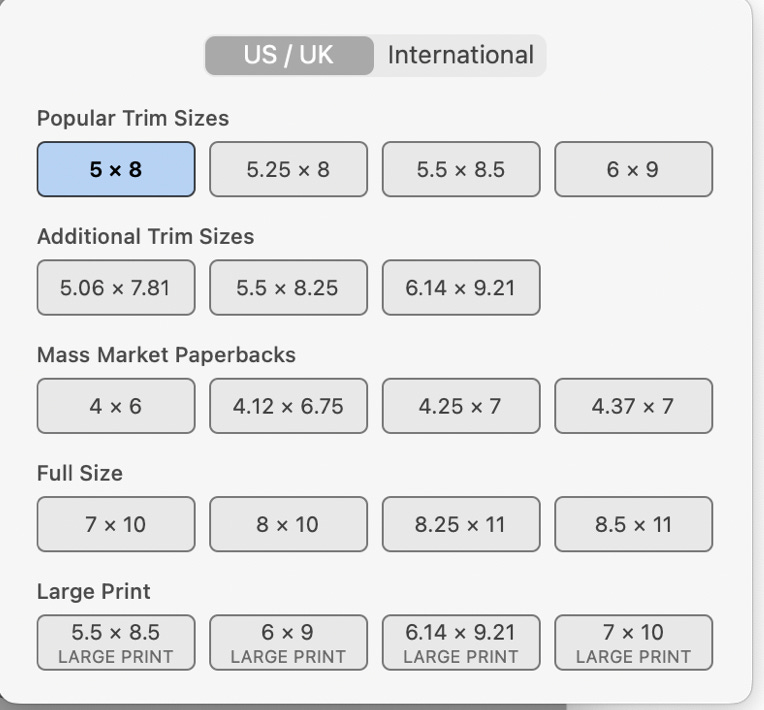
These programs show the layout for epubs, and if you toggle a selection, you’ll also see the print layout. The programs are adding features all the time, so you can currently add header images, fonts, custom backgrounds, and many other options. They do have a limited size selection, as shown in this image. (Accurate when article was written.)
The beauty of these programs is, of course, that you get both epub and print layouts. If you use the book templates above, you’ll still have to figure out the ebook at some point. Some would prefer to do both at once.
For children’s books, though, the paperback version sells the best. Beginners can start with the paperback and add the hardcover and ebooks later. So, it might make sense for you to use the programs you’re familiar with, such as MSWord, and just add a template to create the print version. As you build your list, though, you will want to add epubs; I’ve tried every program available and prefer Vellum to create epubs for novels. If you plan to go with Vellum, maybe you want to just start there, instead of the templates.
Look through the the BookDesignTemplates.com for their options. Vellum doesn’t have a gallery of styles, but you can get a glimpse of options here. Atticus doesn’t have a gallery of styles, either, but look at their options here.
Tech Stack for Picture Books
Ah, picture books. Those gorgeous images add so much difficulty to the layout and design phase of creating a children’s book. But the images are also what makes the book work!
Delivery of Files
I’ve written a couple times here and here and a five-post series (for paid subscribers) about working with an illustrator to create images for your story. It’s an important topic, so I’ve written about it a lot!
For our purposes today, it’s important how you take the delivery of the art. You need high-resolution images, at least 300 dpi (dots per inch, a measure of the quality of the art). I alway put in the contract that I need 300dpi, full-size images in either jpg, png, or tiff formats. PNG gives you transparency, so you can stack photos without a background interfering with the images. . TIFF is the highest quality, while JPG has some compression of the images. But all of them work. Once you have these high quality images, you can choose the program to use.
You may also include in your contract that the illustrator delivers .psd files, which are photoshop files, the original files the illustrator works with. Some illustrators will charge more for these files, but some will provide them with the other files.
Be careful: do not copy images from the internet because you’ll likely violate copyright and image optimized for the web (usually 72dpi) will not be high enough resolution to print (minimum of 300dpi required).
Fixed Format ePubs
Before we talk about programs, we also have to cover the difference in epubs for picture books. The idea of an ebook is that the reader can change the fonts to a selection of presets and can change the size of the fonts. When that happens, the text reflows, or moves fluidly from one page to the next. Reflowable ebooks are the norm and allow readers to adapt the ereading process to their needs and preferences.
Reflowable text doesn’t work for picture books, though. The image and text must stay together or the story doesn’t make sense. That means the ebook must force the image and text stay together, called a fixed format ebook. This is sometimes accomplished with CSS, Cascading Style Sheets, which are commands that tell the ereader how to display the images and text. CSS is used on webpages to control the look of the website. However, CSS is interpreted differently by various ereaders leading to inconsistency. With over 100+ different ereaders, including all the old legacy models, it’s impossible—in my opinion—to make the fixed format display correctly. The other option is to create the ebook and export it with text embedded as an image. Essentially, you create an image for every page (or every layout) of the epub.
The restrictions of the fixed format ebook create problems when you create the epub. Fortunately, there’s been developments this year that make it much easier!
Creating the Picture Book
To create picture books, I use Adobe’s Indesign program because it’s powerful and consistent. As noted above, though, it’s only available with a subscription. In 2025, Canva.com bought Affinity, a British-based program that is similar to Adobe, and in a surprise, bold move, they made Affinity free. It’s different from Indesign, but comparable. It’s going to be interesting to see how Canva’s bold move plays out over the next few years. I will continue to use Indesign because I’ve spent years learning it and still consider it the industry standard (plus it exports for international deals).
Using either Indesign or Affinity, you will lay out the story with text and images. The program will export the high quality pdf needed by printers.
That takes care of print, but what about the fixed format epub? Surprisingly, I use Affinity and Calibre (a free software to edit the metadata of the ebook - PC, Mac, Linx) to create simple fixed format epubs. I’ve detailed the exact process of creating fixed-format ebooks for your children’s books here (for paid subscribers).
Complete Tech Stack for Creating Children’s Books
NOVELS
Templates: MS Word, Pages, or Indesign + BookDesignTemplates.com template of your choice.
All-in-one software: Vellum or Atticus, to create both print and ebook.
PICTURE BOOKS
Print: Indesign or Affinity to create the full-color layouts with precision.
eBook: Indesign or Affinity to create the full-color layout and export images. Use the images in Affinity to create the epub, then edit with Calibre to correct the metadata.
Best Tech Stack for Beginners
Because the main product for children’s books is the paperback, you can start with BookDesignTemplates.com and programs that you are already familiar with such as MSWord or Pages.
As soon as you need ebooks, though, you’ll need to upgrade to Vellum or Atticus to create reflowable ebooks. They are comparable and the choice mostly depends on the type of computer you use.
I’m sorry, but if you create picture books, it’s more complicated. Beginners should either dive into Indesign and expect a steep learning curve, or start with the free Affinity program, which still has a learning curve. With either, plan to watch tons of video tutorials on how to layout the book. It’s time well-spent, an investment in your career. I can’t imagine not knowing Indesign and having to depend on freelancers for this important task of creating picture books.
What programs do you use to create your picture books?
I used InDesign in the past, I use Affinity now. And Atticus. (I'm a PC user, so no Vellum). I embed the text in the pictures as I just do very early learner books currently under a pen name. Thanks for the breakdown of tech!
which one of these would be best for illustrated chapter books?